
How to Do the AI Hug Trend on TikTok, Step by Step
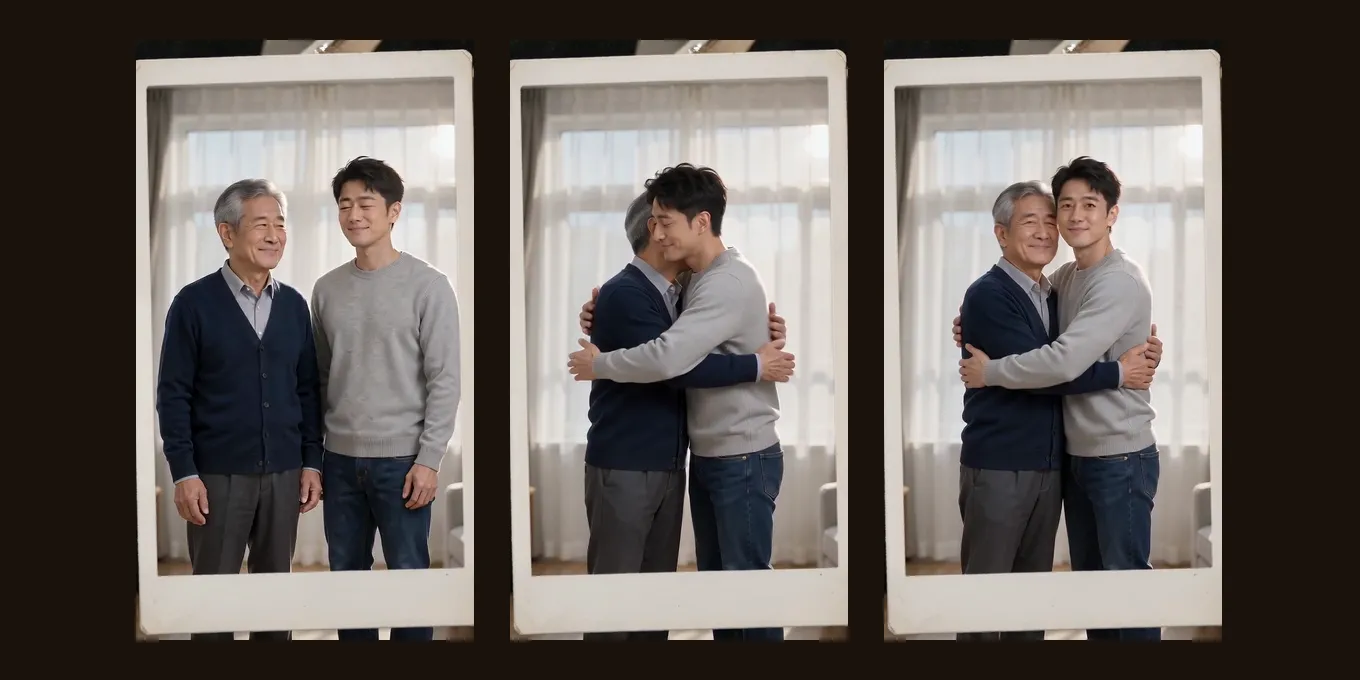
The AI hug trend puts two people who cannot share a photo into one hug: you and your younger self, you and someone who has died, or two people who live far apart. On TikTok it comes in two forms. One is a still picture, often a white-framed Polaroid made with Gemini or ChatGPT. The other is a short video in which the two turn to each other and hug.
Below are the three ways people make it, with the steps for each and the TikTok rule that catches many younger-self posts. The video version is also here: two photos and the Polaroid Hug effect, 4 credits for 5 seconds at 720p.
Updated
AI HUG TREND · HOW TO
3
Three ways to do it
- Chatbot photo
- App or template
- Two photos
Three ways to do the AI hug trend
| Way | What you get | What you add | Cost |
|---|---|---|---|
| A chatbot prompt (Gemini, ChatGPT) | A still photo, often a Polaroid | Two photos and a prompt | Whatever your chatbot plan allows |
| An image-to-video app or a CapCut template | A short hug video | Two photos, or one with both people | The app’s own price or free tier |
| A hug effect here | A 5-second hug video with music | Two photos, or one with both people | 4 credits at 720p |
Way 3
Make your AI hug video here
Two photos, one hug inside a Polaroid. The button shows the credits before you create.
Your two performers
A clear, well-lit photo works best. Two photos put two people side by side.
Choose the stage
Video settings
What should they rap about?
Ready in about 3 minutes; failed generations return your credits. View pricing
Way 1: a Polaroid hug photo with Gemini or ChatGPT
- Open Gemini or ChatGPT and upload two photos: you today and the other person (your younger self, a parent, a friend).
- Ask for one photo of the two of them hugging and say what must stay the same. The Polaroid look creators share is a soft flash, white curtains behind and both faces unchanged (example on TikTok).
- Download the picture. To post it as a video, add it to a TikTok photo post or animate it with Way 2.
Make one photo that looks like it was taken with a Polaroid camera: the person from the first photo and the person from the second photo hug each other, standing, both faces turned a little toward the camera. Soft flash, slight grain, plain white curtains behind them. Keep both faces, hairstyles and clothes exactly as in the photos. No text.Chatbots can change a face a little. Compare the result with the photos before you share it.
Way 2: a hug video from an app or a CapCut template
For the moving version, people use an image-to-video app or a CapCut template opened from a TikTok post. The steps are much the same everywhere: pick the hug template or type “make these two people hug each other”, add the photos, wait, download. In one 2024 tutorial a creator did it in Luma’s Dream Machine with the prompt “Make these images hug eachother” (TikTok).
Apps change quickly: the free tier, the watermark and the price are on each app’s own page. Check them before you buy credits.
Way 3: a two-photo hug video here
- Pick the effect: Polaroid Hug for the Polaroid frame, Hug for plain daylight, Memorial Hug for someone you miss.
- Add two photos, one per person, faces clear. One photo with both people works too.
- Tap create. It runs on Seedance 2.0 Mini at 720p, 5 seconds, 9:16, for 4 credits; the provider quotes up to about 5 minutes. There is no free preview.
- Download the MP4, music included, and post it.
Each face, hairstyle and outfit is kept from its own photo. Our demos used photos of adults; we have not tested childhood photos, so treat a first video with a child photo as a try.
Hugging someone who has passed away
Many of these videos are made for a parent, a grandparent or a friend who has died, and they can be heavy to watch. The hug is an imagined scene, not a real moment. Use a photo you have the right to use, and think about how the family will feel before you post it publicly.
An AI hug with a best friend who passed away almost six years ago, as the post tells it (80.5K views).by @kalyn142 · Watch on TikTok
TikTok posts by other creators, shown with credit and linked to the original. Hover to play; sound starts off.
TikTok’s rules for AI hug videos
- Turn on the AI-generated label. TikTok asks creators to label realistic AI content (TikTok).
- TikTok does not allow AI content showing the likeness of anyone under 18. A hug with you as a child may fall under that rule; you as a teenager over 18 or a younger adult is the safer pick.
- It also does not allow AI content using an adult private person’s likeness without their permission, so ask the other person first.
- Add a soft song from TikTok’s sound library, or keep the music already in the MP4.
FAQ
How do you do the AI hug trend on TikTok?
Make the photo or video in another tool (Gemini, ChatGPT, an app, a CapCut template or a hug effect like the ones here), then post it on TikTok with the AI-generated label on.
How do I do the AI hug trend for free?
A chatbot’s free plan may make the still Polaroid photo, and app free tiers change often. The hug videos on Hotel Lobby Video (rapaivideo.net) are paid: 4 credits for 5 seconds at 720p. There is no free preview.
Can I hug my younger self as a child?
You can upload a childhood photo, but it is untested here, and TikTok does not allow AI content showing the likeness of anyone under 18. A photo of you as an adult is the safer choice for posting.
Can I do the AI hug with one photo?
Only if that photo shows both people. A hug needs two.
Is the AI hug video real?
No. It is an imagined scene made from two photos; the faces follow the pictures and the hug never happened.
Can I do the AI hug trend on Android?
Yes. TikTok, CapCut and most AI video apps have Android versions, and Hotel Lobby Video (rapaivideo.net) runs in Chrome or any phone browser, with no app to install. The finished MP4 downloads to the phone.
Sources
Read next
How to Do the AI Dance Trend: CapCut, Apps or One Photo
How to do the AI dance trend on TikTok: a CapCut dance template from a post (the free way, one fixed dance), an app effect, or a one-photo dance clip here, with the steps and how to add the trend’s sound
Which Photos Work Best for Hotel Lobby AI Videos?
A photo checklist for Hotel Lobby AI: what to pick, what the redraw does to your photo, two photos or one, and what better photos cannot fix
How to Make a Hotel Lobby AI Video on Your Phone (No App)
The whole Hotel Lobby AI video in a phone browser, from camera-roll photos to saving the MP4 in Photos, with iPhone steps we tested
Hotel Lobby Video is an independent tool, not affiliated with Quavo, Takeoff, Migos, Quality Control Music, Motown or COLORS.