
How to Do the Hotel Lobby Trend: 3 Ways, Step by Step (2026)
Make the Hotel Lobby AI video from two portraits, or one photo of both people, in your phone browser. On Hotel Lobby Video, keep Wan 3.0 and the Hotel Lobby original sound for a download with the template track included. A 12-second video at 480p costs 6 credits; the smallest one-time pack is 10 credits for $9.99. No subscription is required. Generation usually takes about 5 to 15 minutes.
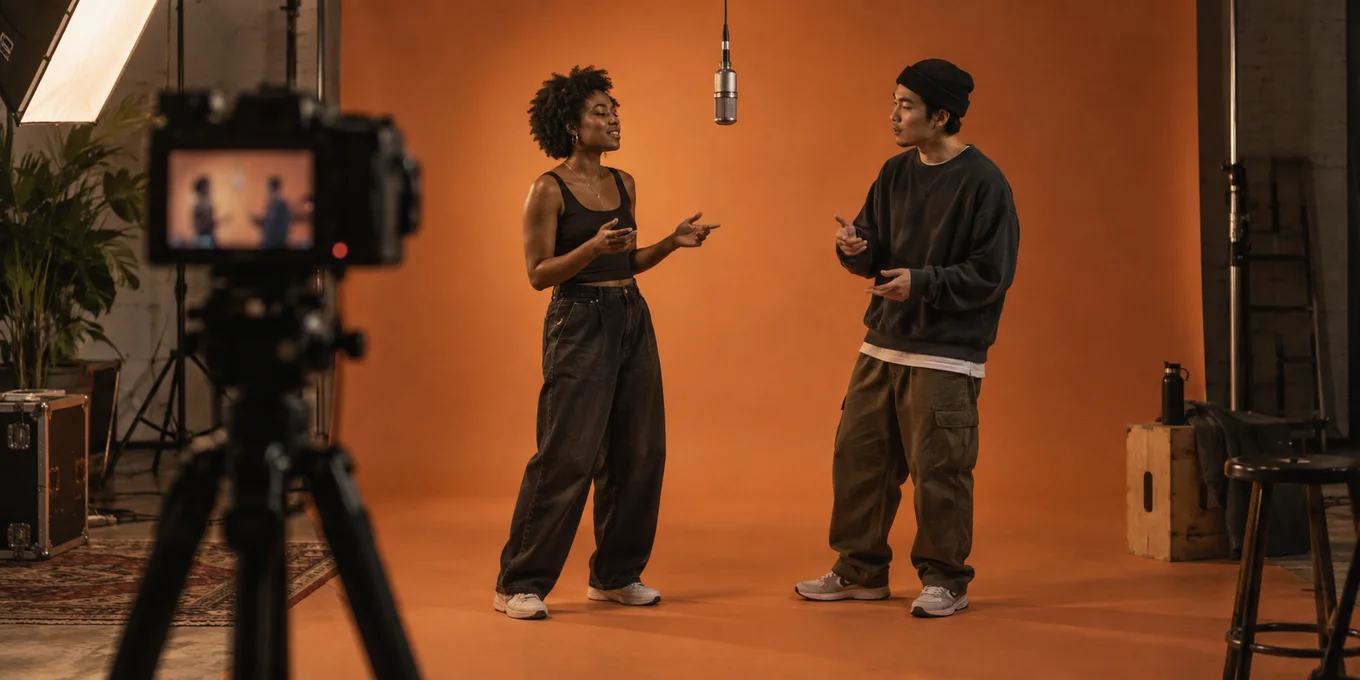
The Hotel Lobby trend, also called Migos AI or the AI rap duo trend, puts two people in the orange booth from Quavo and Takeoff’s 2022 A COLORS SHOW performance of “Hotel Lobby”: one microphone hanging from the ceiling, one person rapping into it, the other hyping on the beat. There are three ways to do the Hotel Lobby trend, from two minutes of effort to an evening of editing.
Updated
HOTEL LOBBY · HOW TO
3
Hotel Lobby: three ways
- Two photos
- A prompt
- An editor
Does the downloaded Hotel Lobby AI video include the original song?
| What you want | Choose here | What the MP4 contains |
|---|---|---|
| The Hotel Lobby template track | Wan 3.0 + Hotel Lobby original | The template track with the generated performance; no separate music-editing step is needed to hear it. |
| Your own recording | Wan 3.0 + Your song | Your selected audio segment. The left performer leads; this does not make both people alternate your exact lyrics. |
| A new rap about your topic | A Seedance model + AI rap | Newly generated rap audio, not the original Hotel Lobby recording. |
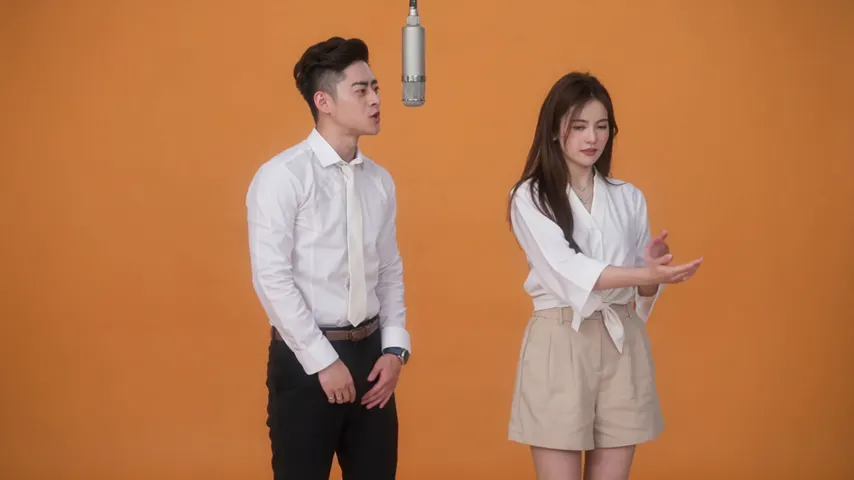
Wan 3.0 · 720p · 12 s · 16:9
- Generated through this website.
- Audio: Hotel Lobby template track.
- Web preview: 854 × 480, compressed for playback. The settings above describe the original render.
Watch this selected website render with sound before buying credits. It demonstrates one result, not a success rate or a guarantee of likeness. Audio included in a download does not grant music rights for every use. When posting, follow the platform’s sound and AI-label rules; avoid playing two tracks over each other.
Way one, right here
Do the Hotel Lobby trend here
The two-photo way: add a photo of each person, or one of you both, pick the format and check the credits on the button.
Your two performers
A clear, well-lit photo works best. Two photos put two people side by side.
Choose the stage
Video settings
What should they rap about?
Ready in about 3 minutes; failed generations return your credits. View pricing
Three ways to do the Hotel Lobby trend
| Way | What you need | Effort | Cost |
|---|---|---|---|
| A two-photo Hotel Lobby generator | Two photos, one person each | Lowest: no prompt, no editing | On Hotel Lobby Video a 12 s video is 6 credits (10 credits for $9.99); failed renders are refunded |
| A prompt in a general AI video model | Two photos and a written prompt, sometimes a reference clip | Medium: you write and retry the prompt | That tool’s credits or plan |
| An editor template | An AI clip made elsewhere, plus a template with the original clip and audio | Highest: you sync the clip by hand | Kapwing’s free plan exports with a watermark |
Press coverage says the trend uses tools like Starrd, Summrs and CapCut templates (Complex). Dedicated two-photo sites followed within days.
How to make the Hotel Lobby AI video with two photos
This is the two-photo way, step by step, on Hotel Lobby Video (rapaivideo.net). The screenshots are the real generator on a phone, taken on 16 October 2026 with two AI-made people. It works the same on a computer.
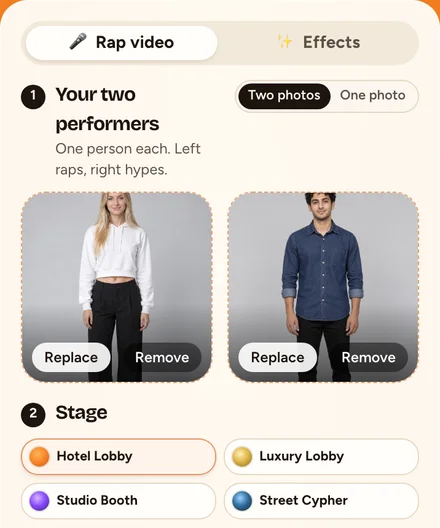
Step 1: Add two photos
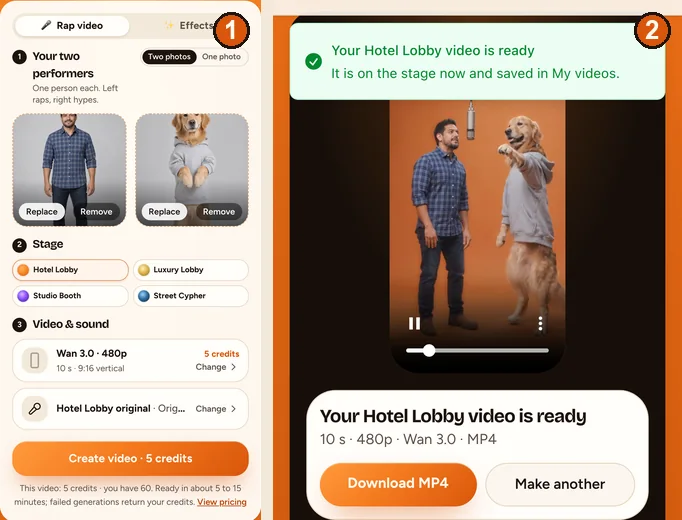
Tap each photo slot and pick one photo per person: face clear and well lit, waist up or full body, no sunglasses. The left photo raps into the mic and the right one hypes. With one picture of you both, switch Two photos to One photo. The photos do not need to be taken together.
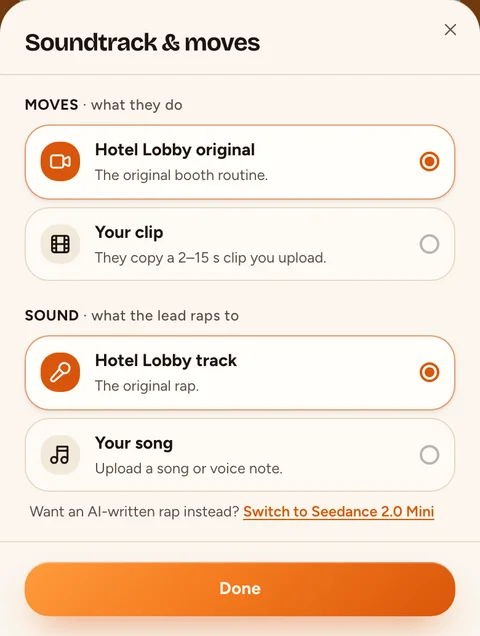
Step 2: Keep the Hotel Lobby stage and sound
Leave the stage on Hotel Lobby. Tap Change on the sound row to open Soundtrack & moves: Hotel Lobby original keeps the booth routine and the Hotel Lobby track. Here you can also pick your own song (the lead lip-syncs to it), your own clip (your pair copies its moves) or, on a Seedance model, an AI rap about a topic you type.
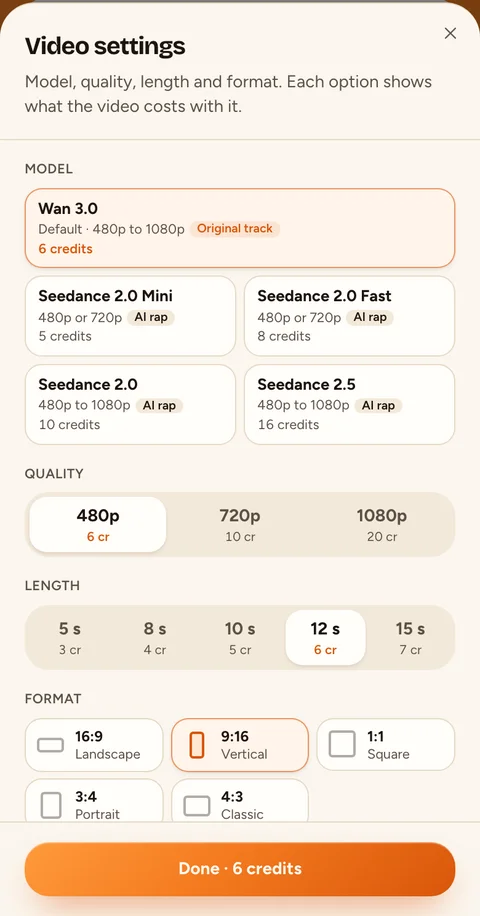
Step 3: Pick the format, length and quality
Tap Change on the Wan 3.0 row to open Video settings. Choose 9:16 for TikTok and Reels or 16:9 for YouTube, 5, 8, 10, 12 or 15 seconds, and 480p, 720p or 1080p. Every option shows its credits, and the price on the button follows what you pick.
Step 4: Create the Hotel Lobby AI video
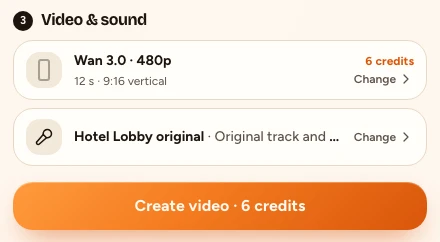
Tap the button. It reads Create video with the credits. You sign in with Google, and if your balance is short the price sheet opens; once you pay, the video starts by itself. A 12-second video at 480p is 6 credits.
Step 5: Wait, then download the MP4
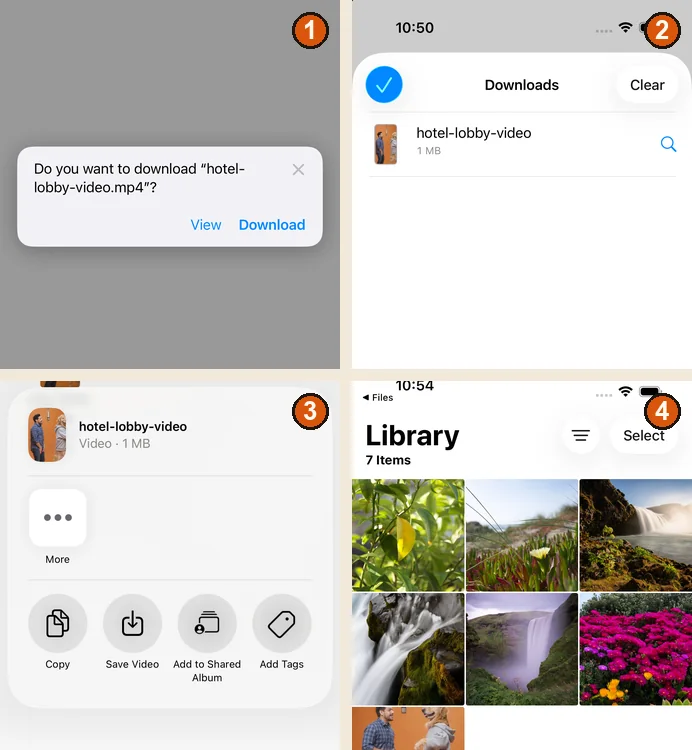
A render usually takes about 5 to 15 minutes. You can close the tab: the video keeps rendering and waits in My videos. Then tap Download MP4. On an iPhone the file goes to Files › Downloads; open it, tap Share and choose Save Video to put it in Photos. Credits are paid when you create, so the download has no watermark, and a failed render is refunded automatically. With Wan 3.0 and Hotel Lobby original, the Hotel Lobby track is already in the MP4; if you add a platform sound when posting, check that the two tracks do not overlap.
What a finished Hotel Lobby AI video looks like
Two of our own renders with AI-made people, made through the same pipeline as the site, both with the Hotel Lobby track: a 16:9 video at 480p, 10 seconds, and a 9:16 one at 480p, 10 seconds, with a corgi as the partner. Each is one render, not a promise of every result.
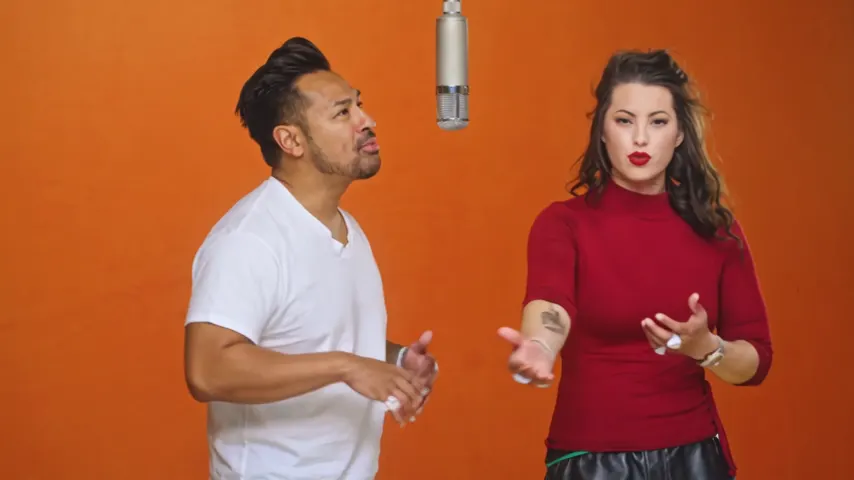
Wan 3.0 · 480p · 10 s · 16:9
- Product test render, made outside the website with our generation pipeline.
- Audio: Hotel Lobby template track.
- Web preview: 854 × 480, compressed for playback. The settings above describe the original render.
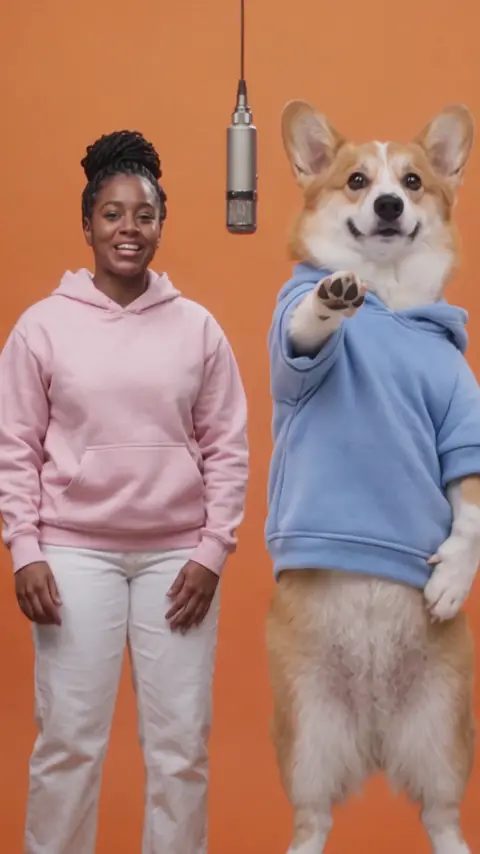
Wan 3.0 · 480p · 10 s · 9:16
- Product test render, made outside the website with our generation pipeline.
- Audio: Hotel Lobby template track.
- Web preview: 480 × 854, compressed for playback. The settings above describe the original render.
And two Hotel Lobby AI videos from TikTok, credited to their creators below: two cats at the mic, one of the most watched versions, and two friends who put themselves in the booth.
Two cats in the orange booth, one of the most watched Hotel Lobby AI videos (6.1M views on TikTok by 16 Oct 2026).by @therealmeowfia · Watch on TikTok Two friends swapped into the booth with AI: the version most people want to make.by @derriawhite · Watch on TikTok
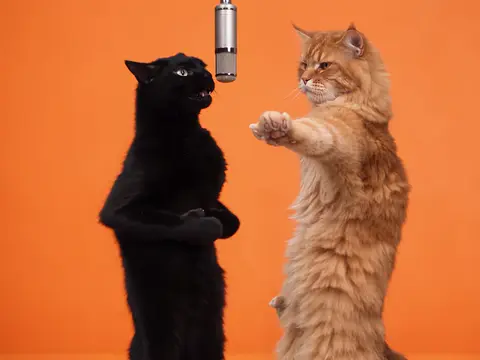
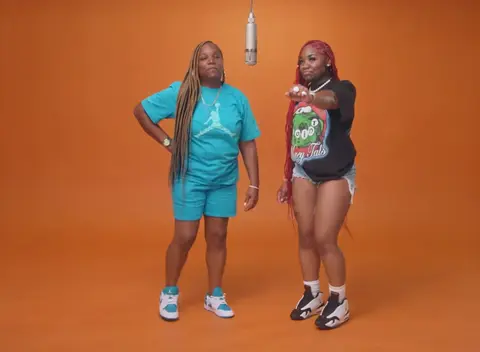
TikTok posts by other creators, shown with credit and linked to the original. Hover to play; sound starts off.
How to do it with a prompt
General AI video models can make the scene if you describe it well and give them both photos. Dreamina (CapCut) publishes copy-paste prompts for its Seedance 2.5 image-to-video model, for example. The prompt has to pin down four things: the orange booth, the single hanging mic, who stands left and right, and what each person does.
We publish the exact prompt our generator uses, line by line, in the Hotel Lobby AI prompt guide, with five more for tools that take only two photos: a couple, best friends, a grandparent and grandchild, illustrated characters and pets.
Can you do the Hotel Lobby trend for free?
Partly. Rendering AI video costs money, so free options come with limits. What each tool’s own page said on October 15, 2026:
- Hotel Lobby Video: no free video. Every render is paid with credits (6 for a 12 s video), and a failed render is refunded.
- Kapwing: the free plan exports with a watermark at 720p, but you bring the AI clip yourself.
- Fuzana: a free booth photo preview without an account; the video needs a credit pack.
- LightX: the free Starter plan gives 6 AI credits a day; its paid plans work out to about 50 credits a video.
- Dreamina: may give free credits or trial access to eligible accounts.
The full list with prices is in Best Hotel Lobby AI video generators, every free route, tool by tool, is in Hotel Lobby AI free, and what each app makes is in Hotel Lobby AI apps compared.
How to do it with CapCut, Higgsfield or a phone app
- CapCut: a template pastes your face onto an existing clip, usually one face, with the original song. The most-used “hotel lobby” templates on CapCut’s site predate the AI trend. Details in the Hotel Lobby CapCut template guide.
- Higgsfield: Genjutsu recasts the original clip with your photos through a community preset; a 15-second video costs 40 to 144 credits. Steps and prices in Higgsfield Hotel Lobby.
- Phone apps: no app is called Hotel Lobby, but MIU AI, Pose, PixVerse Lite, FaceLab and Photo Dance run Hotel Lobby events until late October 2026. On Hotel Lobby Video nothing needs installing; it runs in the phone’s browser.
Two creators show the Higgsfield route in their own words below: one asks Claude, connected to Higgsfield, to recast the clip with two characters; the other uses Higgsfield’s motion transfer with his own photos.
A walkthrough: connect Higgsfield to Claude, give it the clip and two characters, say who stands where, then add the sound (27.6K views).by @vascoyaps · Watch on TikTok A walkthrough with Higgsfield’s motion transfer: two of his own photos and a prompt, then the result (4.8K views).by @socialgeminis · Watch on TikTok
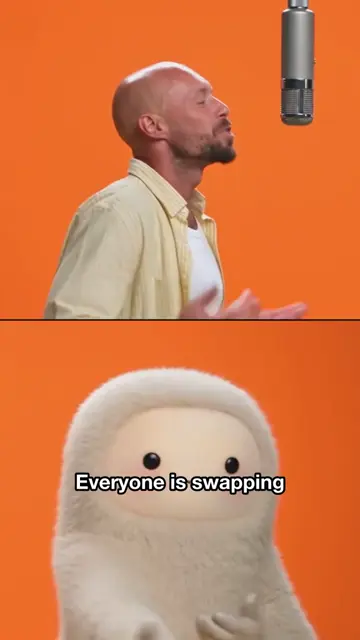
TikTok posts by other creators, shown with credit and linked to the original. Hover to play; sound starts off.
Hotel Lobby trend video tutorials
How video-to-video character swap tools recast the two performers.by Create with Dave · Watch on YouTube A beginner lesson with two ways to make the video, including one without a TikTok account.by Time To Pivot · Watch on YouTube
Clips by other creators. Press play to watch here; the player comes from the platform the clip was posted on.
Tips for a better Hotel Lobby video
- Faces decide the result. Front-facing, evenly lit photos with nothing covering the face work best.
- Waist up or full body carries the outfit over; a tiny face in a group shot does not.
- Put the more expressive person on the left. The lead carries the performance; the partner reacts.
- Pick 9:16 before you create if the clip is for TikTok or Reels, so nothing important gets cropped later.
- For your own audio, choose a part that starts on a word rather than on silence.
How to post your Hotel Lobby video
- Post it vertical, 9:16, on TikTok, Instagram Reels or YouTube Shorts.
- The default video already plays the Hotel Lobby song. If you made an AI rap or used your own song and want the original on the post, add the official “Hotel Lobby” sound from the app’s music library when you upload, if it is available in your region.
- Label it as AI. On TikTok, tap More options before posting and turn on AI-generated content (TikTok Help). On YouTube, under Attributes in the upload details, answer Yes to AI use when the result looks real (YouTube Help). Instagram asks you to use its AI label on realistic AI video (Meta).
- Tag it #hotellobby so people following the trend find it.
Remake another viral video the same way
The same trick works for other dances and skits. On Hotel Lobby Video, open Soundtrack & moves and upload your own clip of 2 to 15 seconds: the two people from your photos copy its moves on the stage you pick, with the clip’s own sound, the Hotel Lobby track or your own song. The video follows the clip’s length. Use clips you have the right to use.
Do it respectfully
FAQ
How do I make the Hotel Lobby AI video?
Add a photo of each person, or one of you both, on Hotel Lobby Video (rapaivideo.net), keep the Hotel Lobby stage and sound, pick 9:16 and a length, and tap the button. It takes about 5 to 15 minutes; then download the MP4.
What app do people use for the Hotel Lobby trend?
Complex names Starrd, Summrs and CapCut templates among the tools the trend uses. Two-photo web generators such as Hotel Lobby Video, Rap Duo AI and LightX need no app.
How do I do the Hotel Lobby AI trend on my phone?
Open a two-photo generator such as Hotel Lobby Video in your phone’s browser, add a photo of each person and create; or use a phone app running a Hotel Lobby template. Pick 9:16 for TikTok and Reels.
Is the Migos AI trend the same thing?
Yes. Migos AI, the Migos trend and the Hotel Lobby AI trend are the same clips, so the same steps work.
How long does a Hotel Lobby AI video take?
On Hotel Lobby Video, usually about 5 to 15 minutes. Other tools state their own times on their pages.
Can I use the original Hotel Lobby song?
Yes, when you choose Wan 3.0 and Hotel Lobby original: the downloaded MP4 includes the template track. Seedance creates new AI rap audio instead. Inclusion does not grant permission for every use; check the rights and platform rules before posting.
Where can I do the Hotel Lobby trend from two photos, and is there a free preview?
On Hotel Lobby Video (rapaivideo.net) you add two photos (or one of both) in a phone or computer browser, with no app. The default Wan 3.0 video keeps the Hotel Lobby song in the MP4: 6 credits for 12 seconds at 480p, packs from 10 credits for $9.99, no subscription needed. The MP4 has no watermark, and it takes about 5 to 15 minutes. There is no free preview.
What other AI trends work like the Hotel Lobby trend?
Viral clips re-made with your face and the clip’s own sound: Bulin 47 (one photo, the dembow freestyle), Burning Bridges (one photo, Drake’s chandelier party) and APT. (two photos, the pink studio). Each one is 12 to 15 seconds and is paid with credits, like the Hotel Lobby video.
Sources
Read next
Hotel Lobby AI Free: What Is Really Free for the Trend
What is actually free for the Hotel Lobby AI trend, tool by tool and app by app, checked on their own pages: free credits, watermarks, limits and prices
Hotel Lobby CapCut Template: What Exists and What Works
The Hotel Lobby CapCut templates that exist on CapCut’s site, how a template works, where CapCut points for the AI version, and when a two-photo generator fits better
Hotel Lobby Trend Ideas: 15 Duos and What They Rap
Fifteen Hotel Lobby trend ideas by pairing, each with the sound to pick (Hotel Lobby track, your own song or an AI rap) and a topic line
How to Make a Hotel Lobby AI Video on Your Phone (No App)
The whole Hotel Lobby AI video in a phone browser, from camera-roll photos to saving the MP4 in Photos, with iPhone steps we tested
Which Photos Work Best for Hotel Lobby AI Videos?
A photo checklist for Hotel Lobby AI: what to pick, what the redraw does to your photo, two photos or one, and what better photos cannot fix
Hotel Lobby Video is an independent tool, not affiliated with Quavo, Takeoff, Migos, Quality Control Music, Motown or COLORS.