
How to Make an AI Rap Video: Step by Step (2026)
To make an AI rap video, add two photos (or one of both people), pick a stage and a sound, set the options in Video settings and create. Every option shows its price first, a render usually takes about 5 to 15 minutes on Wan 3.0, and a failed render is refunded.
Updated
AI RAP VIDEO · HOW TO
3
From photos to a rap video
- Photos
- Stage + sound
- Video settings
Step by step
- Open the generator on the Rap video tab.
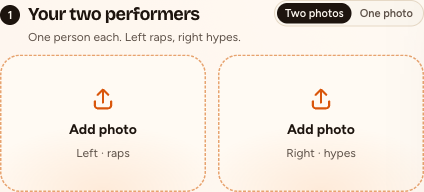
- Add two photos, one person each, or one photo of both. Left raps into the mic; right is the hype partner.
- Pick the stage. Hotel Lobby (orange) re-shoots a reference clip that follows the original performance move for move, so booth, mic and routine match the trend. The other stages need a Seedance model.
- Pick the sound (an AI rap on Seedance; your song or the Hotel Lobby track on Wan 3.0) and the moves: the Hotel Lobby moves or your own clip of 2 to 15 seconds.
- Open Video settings: model, quality, length, format. Each option shows its price in credits.
- Create, and sign in with Google if you have not yet.
- Wait: usually about 5 to 15 minutes on Wan 3.0, up to about 5 minutes on Seedance by the provider’s estimate. The video waits in My videos.
- Watch your video and download the MP4. Credits are paid when you create, so the video comes clean; a failed render is refunded.
What each option does
| Option | Choices | What it changes |
|---|---|---|
| Photos | Two photos, or one of both | Who is on stage; left raps, right hypes |
| Stage | Hotel Lobby (orange), Luxury Lobby, Studio Booth and Street Cypher | The set; all but Hotel Lobby need Seedance |
| Sound | A rap about your topic (Seedance); your song, the Hotel Lobby track or your clip’s sound (Wan 3.0) | What the lead raps to |
| Moves | Hotel Lobby moves or your own clip (2 to 15 s) | What the pair does |
| Model | Wan 3.0 (default), Seedance 2.0 Mini, 2.0 Fast, 2.0 and 2.5 | Price and sound: tracks need Wan 3.0; topics and other stages need Seedance |
| Quality | 480p, 720p or 1080p on Wan 3.0; 480p to 1080p on Seedance | Sharpness and price |
| Length | 5, 8, 10, 12 or 15 s in the booth; 5, 8, 10, 12, 15, 20 or 30 s elsewhere (20 or 30 s only on Seedance 2.5) | Duration and price |
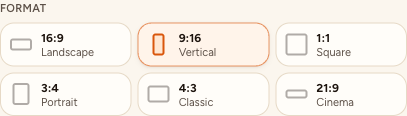
| Format | 16:9, 9:16, 1:1, 4:3 or 3:4 | Frame shape; never the price |
The three sounds
- A rap about your topic (Seedance): type up to 120 characters or leave it empty. The AI writes an original, clean verse and beat in the topic’s language (the page’s language if empty), and the lead raps it. With Both rap, the two trade bars. No existing songs, lyrics or artist voices.
- Your song (Wan 3.0): an MP3 or WAV; pick up to 15 seconds and the lead lip-syncs. Use only audio you have the right to use.
- The Hotel Lobby track (Wan 3.0): the lead lip-syncs to it in the Hotel Lobby booth or over your own clip.
What an AI rap video costs
Credits per video, shown on every option before you create. A standard 12-second Wan 3.0 video at 480p is 6 credits; format never changes the price.
| Video | Credits |
|---|---|
| Wan 3.0 480p, Hotel Lobby moves, 5, 8, 10, 12 or 15 s | 3, 4, 5, 6 or 7 |
| Wan 3.0 720p, same lengths | 4, 6, 8, 10 or 12 |
| Wan 3.0 1080p, same lengths | 8, 12, 16, 20 or 24 |
| 12 s rap from a topic, Seedance 2.0 Mini 720p (any stage) | 10 |
| Any 12 s Seedance video | from 5 credits (Seedance 2.0 Mini, 480p) to 90 (Seedance 2.5, 1080p) |
- No free video: every render is paid with credits when you create it. A failed render is refunded automatically.
- Smallest pack: 10 credits for $9.99, never expires. Cheapest plan: Basic, 100 credits a month for $29.90. See pricing.
Topic tips
- Name people and one detail: “Priya’s smoke alarm cooking” beats “my friends”.
- One idea per video; 12 seconds is short.
- For Both rap, give them something to argue about: “who is the worse driver, Sam or Jo”.
- Ideas: funny rap lyrics, rap battle roasts, a birthday rap song.
Troubleshooting
| Problem | Fix |
|---|---|
| Blurry or unlike faces | Front-facing, well-lit photos, waist up; a higher quality |
| The wrong person raps | The left photo leads, so swap them. In one photo of both, the person on the left leads |
| No topic box, or a stage is missing | Switch to a Seedance model |
| Topic refused | Sexual or hateful topics are refused before any charge; rewrite it |
| Render failed | Credits come back automatically; adjust the photos or topic and retry |
Post your AI rap video
- Pick 9:16 before you create for TikTok, Reels or Shorts.
- Download the MP4. Videos stay in My videos; photos are deleted after 7 days.
- Use only photos you have permission to use, and ask before you post.
FAQ
How long does an AI rap video take?
Usually about 5 to 15 minutes on Wan 3.0; up to about 5 minutes on Seedance, by the provider’s estimate.
How much does an AI rap video cost?
On Seedance 2.0 Mini at 720p, a 12-second rap from your topic is 10 credits on any stage. A failed render is refunded automatically.
Can I use one photo?
Yes, if both people are in it; the person on the left leads. For a solo clip, use an effect.
Can I download the lyrics?
No. The rap comes only as the MP4, with the song as its audio.
Read next
Funny Rap Lyrics: 18 Clean Bars About Work, Food and Friends
18 original, clean funny rap bars about everyday life, and how to write your own
Rap Battle Roasts: 25 Funny, Clean Lines for Friends
25 original, clean rap battle roasts for friends, plus how to keep a roast kind and film the battle
How to Make an AI Rap Battle Video From Two Photos
An AI rap battle from two photos: a topic with two sides, Both rap on a Seedance model, what to check, and when to record your own lines
How to Make an AI Rap Video in Your Language
AI rap in your language: how the topic sets the language, how to write names and details, what to check, and when to record your own words
Hotel Lobby Video is an independent tool, not affiliated with Quavo, Takeoff, Migos, Quality Control Music, Motown or COLORS.